Planet City: A High-Energy Typeface Built for Impact
If you're drawn to bold, futuristic visuals with a racing edge, Planet City might already be on your radar. This all-caps display typeface is designed to evoke motion, speed, and high-tech energy—making it a go-to for branding in motorsports, gaming, and event design. But while its aesthetic is striking, using it effectively requires more than just picking it from a font menu. Understanding its strengths, limitations, and best use cases can make the difference between a design that pops and one that falls flat.
Why Planet City Stands Out
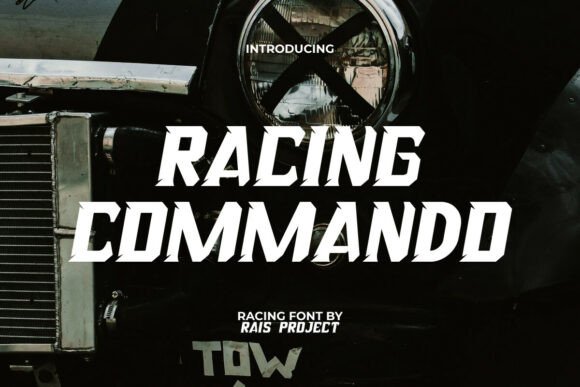
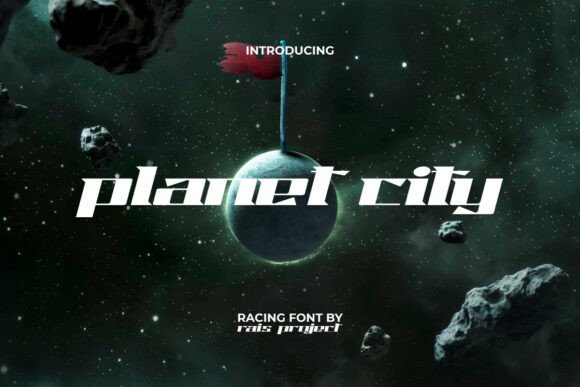
What makes Planet City unique is its dynamic contrast between thick and thin strokes, paired with sharp, angular letterforms. These design choices give it a futuristic, aerodynamic feel that works exceptionally well in high-energy contexts. Whether you're designing a race team logo, a gaming interface, or an event poster, this font helps communicate urgency, speed, and modernity.
Its all-caps structure and geometric styling also contribute to its bold presence. Unlike more traditional fonts, Planet City isn't meant for long paragraphs or body text. It shines in headlines, banners, and visual accents where impact is key. And with compatibility across Adobe Suite, CorelDRAW, Microsoft Word, and more, it's accessible for both hobbyists and professionals.
Common Mistakes When Using Planet City
Despite its popularity, many users fall into predictable traps when working with Planet City. These missteps can undermine the font's strengths and lead to poor readability, inconsistent branding, or wasted time. Here are some of the most frequent issues—and how to avoid them.
1. Using Planet City for Long Text Blocks
One of the most common mistakes is using Planet City for extended body copy. Its angular, stylized letterforms are difficult to read in paragraph form, especially at smaller sizes. This can make content feel overwhelming or inaccessible to your audience.
Better approach: Reserve Planet City for headlines, titles, or short bursts of text where visual impact is the goal. Pair it with a clean sans-serif or serif font for body copy to maintain readability while preserving your design's energy.
2. Ignoring the Importance of Kerning
Because of its sharp angles and extended letterforms, Planet City can sometimes create uneven spacing between characters. If not manually adjusted, this can make text appear disjointed or visually unbalanced.
Better approach: Always check and adjust the kerning when using Planet City in titles or logos. Even minor tweaks can significantly improve the visual harmony and legibility of your text.
3. Overusing It Across Branding Materials
While Planet City has a strong personality, overusing it across multiple design elements can dilute its impact. Seeing the same bold font repeatedly can become visually tiring or lose its novelty.
Better approach: Use Planet City strategically—such as in a logo or a featured headline—and complement it with supporting fonts that are more subdued. This creates visual hierarchy and ensures your design remains engaging across formats.
4. Not Checking Licensing Before Use
Font licensing is often overlooked, especially when downloading from third-party sites. Some versions of Planet City may come with limited or commercial-use restrictions, which could lead to legal issues if you're using it in client work or for business branding.
Better approach: Always verify the licensing terms before downloading or purchasing Planet City. If you're unsure, buy directly from reputable font marketplaces or contact the designer for confirmation.
What to Check Before Downloading or Buying Planet City
Before committing to Planet City for your next project, consider the following factors to ensure it's the right choice for your needs:
- Intended Use: Is this for a logo, headline, or body text? Planet City works best in short, impactful applications.
- Compatibility: Confirm that the font works in your preferred design software—Adobe, CorelDRAW, etc.—and that it exports cleanly across file formats.
- Character Set: Check if the font includes all the symbols, numbers, and special characters you need, especially for multilingual or technical use.
- Weight Options: Does it come in multiple weights? Having options like bold or light can help you create contrast and visual interest without relying on a single style.
Choosing the Right Context for Planet City
One of the biggest advantages of Planet City is how well it aligns with fast-paced, high-energy themes. It’s ideal for:
- Motorsport branding and event posters
- Gaming interfaces and esports logos
- Technology product launches or futuristic branding
- High-impact advertising and digital banners
However, it's less suited for:
- Academic papers or formal reports
- Mobile app UI where legibility is critical
- Printed materials with small text
Pairing Planet City with Other Fonts
To get the most out of Planet City, consider how it works alongside other typefaces. A good pairing should balance its futuristic edge with clarity and readability.
Try these combinations:
- Planet City + Roboto – Clean, modern sans-serif for digital interfaces.
- Planet City + Montserrat – Offers a geometric but more neutral look for branding materials.
- Planet City + Open Sans – Great for web design where readability and contrast are key.
Final Thoughts: Make Planet City Work for You
Planet City is more than just a stylish font—it's a design tool that brings energy and motion to your visuals. But like any powerful tool, it requires thoughtful application. Avoid common mistakes like poor kerning, inappropriate use in body text, or licensing oversights to ensure your designs are both effective and professional.
By understanding its strengths and limitations, you can use Planet City to create bold, memorable visuals that resonate with your audience. Whether you're a marketer designing a campaign, a gamer branding your channel, or a designer crafting a logo, Planet City offers a unique edge—if you use it wisely.